Dark Lights:
-light mapping
-Shadow mapping
Export:-> light ->File ->Code-> light mapping properites-> shadow mapping properites
Dark World Shader:
-work with default shaders
-minipulate properies of default shaders-load shaders and minipulate properites(Research everything)
New file formats:
Objects:positions
rotations
size
color or texture (parse to find out which)
shading file or default shading (parse to find out which)shading properties
Collisions
Later:
-vector data
-create vector minipulation program
File structure:Can make individual files for the certain programFinal export has all the properites loaded for that element.
Work on making a more understandable enviroment for Dark World Lights
Need to have 3D lines to tell the lights range, direction, point, spot and othervisual light related data.
Dark World Update:
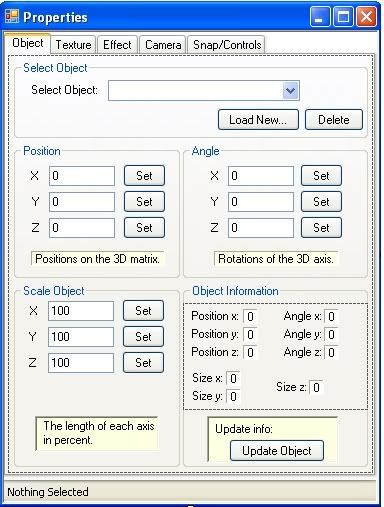
-A properties window at the bottom
-Items toolbar on side - already have
-Items have several selections:
-Objects
-Lights
-Particles
-images
-Zones ~ include zones with event triggers in function form in the engine.
-Info Dialog for displaying selected elements information.-Toolbar with tools:
-Zoom - Don't like not as efficient as my movement. -Rightclick dialog pops up that you can edit for that button. use a content menu for that and have it under edit properties.
-rotation buttons, position buttons, and selecting buttons.
-Change of cursors with is helpful. -Noticed texture flag under textures side panel
-Add and delete buttons for each element is nice.
-rightclick on element under list view to open content menu for my program.
-Autocam button - when object moves camera follows = my follow object on menu.
-Cloning - Nice feature for making object very fast-Grouping
- can group elements and move as one unit. (Set limbs to the object to first selected as a part of the group)
Useful functions found:
-Converting objects into one object
- use in dark world engine-Matrix to world coord. convertions
- use in terrain engine
ENGINE STRUCTURE:
-Make basic setup and release restricted part of it as another beta-Create a bunch of media related things for promoting the engine-Create future fake screenshots to post-Make basics for each program and get into depth later-find out how to shell to the compiler to come up with precompiler program.How to use precompiler:-put file by DB Pro. compiler. Use execute file and put the path of the .dbprofile that you are using and want to send to the compiler. The precomiler will find the file that has to be converted. It will read the data and convert the syntex to normal syntex then it will save a .dbpro file with the new path of the .dba that is converted then it will create a .dbpro file and send it to thecompiler. The compiler will convert the file to a .exe and delete the source dump.
Make a program that makes precompilers, so any user can create there own commands.-Don't give away where the files are. Just have functions that they want to convertto commands an it will do the rest.
Requirments:
-Sparkies DLL
-Newton Physic Wrapper
-D3D Plugin
-Dark Basic Professional and Updated-Maybe...The .net Framework runtime
-Advanced Terrain
Have to credit everyone who contributed to the creation of your game:
When your game starts:
-Dark World Gaming Engine Logo with web address under it at the start of the game.
-Picture combining a representation of all the plugins with names in it of all of them.
Credits:
-Dark World Gaming Engine:
www.darkworldengine.co.nr-Newton Physic Wrapper-
D3D Plugin-Dark Basic Professional
-.net Framework runtime
-Advanced Terrain
Giving you and other third parties credit:
-Game Made By:
-Sounds by:
-World builder:
-Programmer:
-Game Tester: